Methods | Options | Submission Forms
General Submission Rules
Section 1: of Communication A6377 (guide to steps and the use of the application)
How is the “detalle.xml” descriptor file generated?
In this link you will find the application “XML Generator of Information Regimes” that allows you to generate the “detalle.xml” file. It is not mandatory to use this application to generate the xml file. It can be generated using any software tool, taking as a premise the file “bcra esquema.xsd”, which is in this Link.
In this Link you can see the user guides of the application “XML Generator of Information Regimes.
How do I include in the “detalle.xml” a file that is not available in the application that generates the descriptor file?
When within the “Files” drop-down option available in the “XML Generator of Information Regimes” application, the file you wish to submit (e.g. Statute and Logo files of the IR Institutional Information) is not found, the following alternatives are presented:
a) Choose the “Other” option and then load the complete path in the “File folder” field, as shown in the following image:
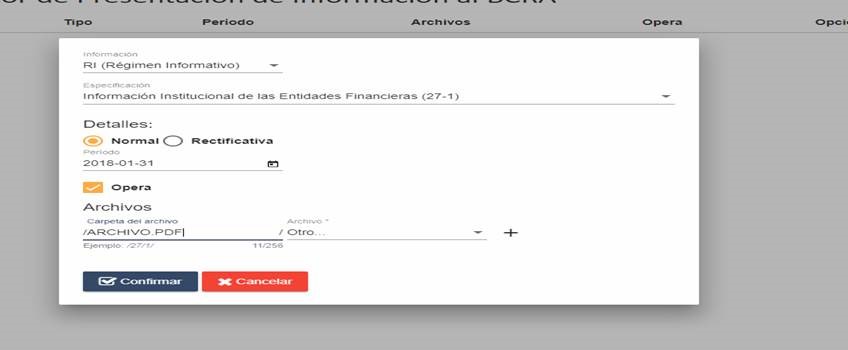
b) Any file is chosen from the list of mandatory and the descriptor file “detalle.xml” is generated. Then you must edit the document with the notepad and replace the file that generated the page automatically with the name of the pdf that is needed.
How do I declare the mailbox where I want to receive notifications of follow-up submissions?
In this link , the entity must take extreme precautions with its Systems / Computer Security area that its mail server allows unsafe emails from the sender mft-no-responder@bcra.gob.ar. This is essential for notifications to be received in addition to having uploaded/declared the corresponding email.
In this Link you have a guide for the declaration of the notification e-mail.
Where is the information to be submitted uploaded?
In the “MFT Presentation Upload” option in https://mft.bcra.gob.ar
In this Link they have explanatory videos to upload information.
How do I follow up on submissions?
In the “Presentation Tracking Module” of https://www3.bcra.gob.ar/ConsultaPresentacionesMFT/listado
How is the descriptor file generated for the High Amount Cash Transaction Report (RTE) IR?
In accordance with the provisions of Section 8 of “Submission of Information to the Central Bank”, the submission must be made individually in a single ZIP exclusive for this requirement (5.4), i.e., it must not contain other Information Regimes. Both the XML files with the reported operations, as well as the descriptor file (detalle.xml), must be stored directly in the root directory of the ZIP file presented, so no subfolder should be created.
The descriptor file (detalle.xml) to be integrated must not contain the TAG “FILE”, and each entity must arbitrate the means to generate it respecting the scheme defined by the BCRA through Communication A6377. In case the application available on this site is used to generate it, the following alternatives must be taken into account:
a) When there are no transactions to be reported, the option “opera = ‘false'” must be entered in the “Detalle.xml” file.
b) When there are operations, the option “opera = ́false ́” must be entered in the “Detalle.xml” file and, once generated, edit the file with the notepad and replace the field indicating “opera = ́true”.
It is emphasized that for the generation of the XML files with each of the operations reported, the schema file (XSD) defined in the documentation available on the UIF website must be respected, that is, that all their characters are generated with UTF8 encoding, being necessary that prior to their presentation to the BCRA they have passed the validation stage of the application of the aforementioned body.